
KOCO 5 News and Weather
HTVMA Solutions, Inc.News & Magazines
4.6940.00 Reviews
- Version
- Varies With Device
- Installs
- 100.00K
- Age Rating
- Everyone
Screenshots
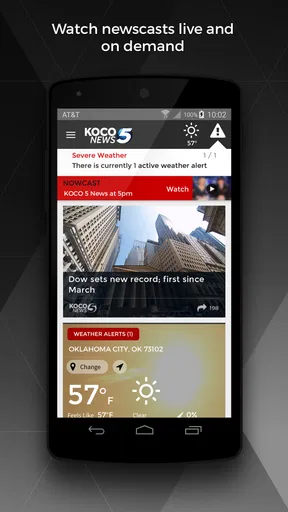
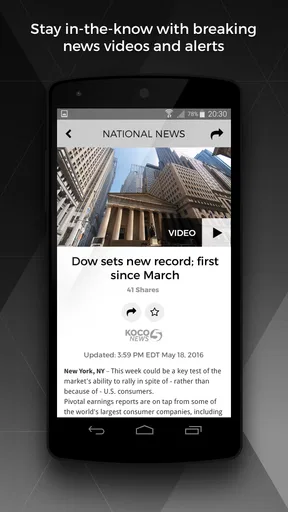
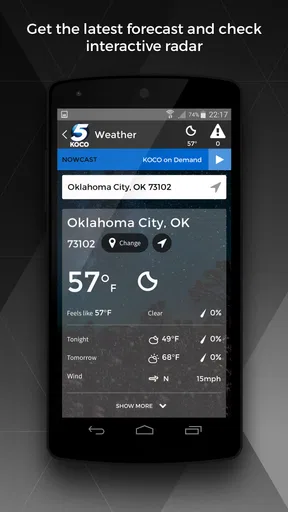
Our Review of KOCO 5 News and Weather
 Analysis by Appyee
When I want a quick local update rather than a broad national news feed, I find KOCO 5 News and Weather easier to understand than a general-purpose news app. It is a free News & Magazines app from HTVMA Solutions, Inc., built around KOCO 5 News coverage, breaking developments, local reporting, and weather information. My first impression is that it has a clear purpose: open it when I want to know what is happening nearby and whether the weather will affect my plans.
That focus is also the main reason I would recommend it. A nationwide news service may offer more topics, while a weather-only app may give me more specialized forecasting tools. This app sits between those choices, combining local headlines with weather updates in one place. It is available for everyone, has passed one hundred thousand installs, and holds a 4.6 average from around 4.2 thousand ratings. Those figures suggest a healthy audience, but I still think the better question is whether its local focus matches your daily routine.
Getting from installation to useful local information
I’d use the first session to check that the local information is actually relevant to my routine, not just to browse headlines. I’d confirm the weather location, scan for a story that could affect my day, and notice whether the reporting gives enough context to be useful. That quick test makes it easier to decide what to revisit and where a broader news or specialist weather source would still help.
What to expect when you open it
I would not approach this as a complete replacement for every news source on my phone. Its value comes from being a convenient local window into KOCO 5 News coverage. The experience makes the most sense for someone who follows local events, wants breaking information from a familiar regional newsroom, or checks weather before leaving home.
The app has been available since May 15, 2012, which gives it a long presence compared with many short-lived news products. That does not automatically make every part of the experience perfect, but it does help explain why the app feels like an established companion rather than a temporary experiment. The developer, HTVMA Solutions, Inc., is presented as the publisher behind the application.
My advice is to decide what you want from it before exploring every screen. If your goal is “tell me what matters locally this morning,” the app should be judged on how quickly it gets you to current headlines and weather information. If your goal is deep investigative reading, worldwide coverage, market analysis, or advanced storm tracking, a larger specialist service may fit better.
The combination of news and weather is more useful than it first sounds. I can imagine checking local headlines while getting ready for work, then looking at weather before choosing whether to walk, drive, or postpone an errand. That saves me from jumping between a national news app and a separate weather tool. The trade-off is that a combined local app may not offer the same depth as two highly specialized alternatives.
First setup: keep it simple and purposeful
After installing it, I would begin by looking for the current local news and weather areas rather than trying to customize everything immediately. A first-time user can easily waste time searching through an app before deciding what matters. I prefer a short first session: open the main news view, identify the latest local stories, then move to the weather section and see whether the displayed information matches the place I care about.
Location is the first practical point to think about. Weather information is only useful when it reflects the right area, so I would check the displayed location before relying on it for a commute or outdoor plan. If the app presents a location choice, I would select the place I actually live or visit most often rather than assuming the first result is correct. That small check prevents the common mistake of reading a perfectly accurate forecast for the wrong town.
I would also take a moment to distinguish current news from older articles. A local newsroom can cover developing events over several updates, and the newest item may add context to an earlier report rather than replace it. Reading the timestamp or ordering of stories helps me understand whether I am seeing a fresh development, a follow-up, or background information.
Because the app is free, it is easy to install as a trial without making a financial commitment. That makes it suitable for someone who wants to compare local coverage with an existing news habit. I would use it for several ordinary days instead of judging it after one opening: a quiet weekday, a busy news day, and a morning when weather affects plans reveal much more about its usefulness.
Your first successful action
For a first meaningful success, I would use the app to answer one concrete question: “What local story should I know about right now, and will the weather change what I do today?” Open the latest news area, choose a headline that affects your community, and then check the weather information before making a plan. This simple two-step routine shows the app’s central strength better than browsing randomly.
A realistic example would be a weekday morning when I need to leave for work. I would scan the local headlines for road, public safety, school, or community developments, then check the weather before deciding when to leave. If a story is still developing, I would avoid treating the first short update as the entire situation. Instead, I would look for related coverage or a newer update before sharing it with someone else.
That last point matters with breaking news. Local apps are useful because they bring attention to nearby events quickly, but speed and completeness are not always the same thing. My habit would be to read the full available article, note whether it is an initial report, and return later if the event is important. The app works best as a fast local briefing, not as permission to make confident assumptions from a headline alone.
Weather is another area where a small workflow helps. I would check the forecast at the moment I need it, then check again before a longer trip or outdoor activity. A morning glance can guide clothing and commuting, but it should not be treated as a permanent answer for the entire day. The useful insight here is that the app becomes more valuable when I connect its information to a decision instead of opening it only out of habit.
Where first-time users may become confused
The biggest possible confusion is expecting a local news app to behave like a national aggregator. KOCO 5 News and Weather is intentionally more regional. That means its narrower coverage is a strength when the story is nearby and a limitation when I want international events, broad political analysis, entertainment from many markets, or a wide range of specialist subjects.
Another point is the difference between news coverage and weather tools. The weather section can be convenient for everyday awareness, but people who need highly detailed meteorological information may prefer a dedicated weather service. A specialist app is usually the better choice when I need advanced radar interpretation, detailed storm analysis, or a very specific planning workflow. I would keep this app for local context and use another tool when weather precision is the main requirement.
News alerts can also create the wrong expectation if I assume every notification represents a complete story. Breaking updates are often short because the situation is still changing. When I receive an important alert, I would open the article, check for additional details, and avoid forwarding an unconfirmed interpretation. This is not a criticism unique to this app; it is simply the sensible way to use any fast-moving news source.
Some readers may wonder whether the app is suitable for the whole family. Its content rating is Everyone, which makes it broadly accessible from an age-rating perspective. Even so, I would still guide younger readers through major breaking stories, especially when the subject is upsetting or complex. An Everyone rating does not turn difficult news into children’s content.
It is also worth remembering that a strong average rating does not guarantee that every user will have the same experience. The app has around 940 written reviews alongside its ratings, and individual expectations can vary widely. Someone who wants local KOCO 5 coverage may find the focus exactly right, while someone looking for a massive all-purpose news library may feel restricted. I would interpret the rating as encouragement to try it, not as a promise that it replaces every other app.
Useful habits beyond the first visit
One practical habit is to use the app as a morning filter rather than continuously refreshing it. I would scan the main local stories, open only the items that could affect my day, and then return later when there is a genuine reason. This keeps the app from becoming background noise and makes its local focus more useful.
A second habit is to compare the shape of a developing story across updates. If an event appears in several headlines, I would read the newest version first and use the earlier pieces for context only when needed. This avoids spending time on repeated information while still preserving the timeline. It is especially helpful for weather disruptions or local incidents where details can change during the day.
A third insight is to separate “awareness” from “action.” The app can tell me that weather or a local event deserves attention, but I should still make decisions using the details relevant to my situation. For example, a general local forecast may be enough for choosing a jacket, while a long drive or outdoor event may justify checking a more specialized source as well.
I also like the idea of using the app as a local-news supplement rather than abandoning every other source. National services are better for stories outside the KOCO 5 area, while a dedicated weather app may be better for technical forecasting. The strongest setup for me would be this app for regional headlines and familiar local context, with another service filling the gaps when my needs become broader or more specialized.
Who should install it, and who should skip it
I think it is a good match for people who live in or regularly follow the KOCO 5 coverage area, want local reporting in a single app, and prefer a straightforward way to combine headlines with weather checks. It is also a sensible option for first-time users who do not want to pay before deciding whether a local news service fits their routine.
I would be more cautious about recommending it to someone who rarely reads local news or expects a universal feed covering every country and subject. It is also not my first choice for a user whose main purpose is detailed weather science, long-range planning, or specialized alerts. In those cases, a dedicated alternative may be more useful, while this app remains a secondary source for local context.
The app’s free price removes one common barrier, but free does not mean every user will find it essential. I would install it if local information affects my commute, family plans, school decisions, or weekend activities. If none of those apply, a general news reader may already cover what I need with less regional emphasis.
My next step after trying it
After the first successful check, I would give the app a small place in my daily routine: one local-news scan in the morning, a weather check before an important outing, and another visit only when a developing story matters. That approach lets me judge its real usefulness without turning every notification into an interruption.
My overall view is positive because the app understands a common need: people want news that feels close to home and weather information that helps with immediate decisions. Its focus is narrower than a national aggregator and less technically specialized than a dedicated weather tool, but that is also why it can feel more convenient. Its best use is as a local decision-making companion, not as the only information source on your phone.
KOCO 5 News and Weather is free, available to an Everyone audience, and supported by a long-running local-news identity from HTVMA Solutions, Inc. With a 4.6 average and more than one hundred thousand installs, it is a credible app to test if KOCO 5 coverage is relevant to you. I would recommend starting with one real morning scenario, checking both a local headline and the weather, then deciding whether that combination earns a regular place on your phone.
Verdict
Strengths of KOCO 5 News and Weather
- Live local news keeps you informed about Oklahoma City and nearby areas.
- Weather forecasts include radar, alerts, and useful hourly updates.
- Breaking-news notifications can arrive quickly during major local events.
- Video reports make important stories easy to follow on a mobile device.
- Simple navigation helps users switch between news, weather, and live content.
Limitations of KOCO 5 News and Weather
- Some notifications may feel frequent or less relevant to your location.
- Advertising can interrupt browsing and reduce the overall reading comfort.
- Coverage is mainly focused on the KOCO 5 viewing area.
- Video playback may use considerable mobile data on cellular connections.
- Certain features may depend on location services and a stable internet connection.
Other Releases by HTVMA Solutions, Inc.
View All
WCVB Newscenter 5 - Boston
News & Magazines4.7

Gulf Coast News - Fort Myers
News & Magazines3.5
Similar Picks in This Category
View All
Google News - Daily Headlines
Google LLC4.0

X
X Corp.4.8

Flipboard:Your Social Magazine
Flipboard3.4

Opera News: breaking & local
Opera4.5

Hindi News by Dainik Bhaskar
Dainik Bhaskar Group4.0

Way2News Daily News App
Way2News ( Formerly Way2SMS )4.6
Frequently Asked Questions
What is KOCO 5 News and Weather?
KOCO 5 News and Weather is the official mobile app for KOCO 5, serving users in Oklahoma City and surrounding areas. It provides local and breaking news, weather forecasts, radar maps, severe weather alerts, live coverage, video reports, and other regional updates. The app is designed to help users stay informed about events that may affect their community, travel plans, and daily activities.
Does the KOCO 5 app provide accurate local weather information?
The app offers current conditions, hourly and extended forecasts, interactive radar, and weather alerts tailored to your selected location. It is particularly useful during Oklahoma’s changing weather conditions, including thunderstorms, tornado threats, flooding, and extreme temperatures. As with any forecasting service, conditions can change quickly, so users should also follow official emergency instructions during severe weather.
Can I receive breaking news and severe weather alerts?
Yes. KOCO 5 News and Weather can send push notifications about breaking local stories, weather watches and warnings, school or traffic updates, and other important developments. You can usually manage notification categories in the app or through your device settings. Enabling location access may improve the relevance of alerts, but users should review permissions and notification preferences after installation.
Does KOCO 5 News and Weather offer live video or streaming?
The application may provide live news coverage, breaking-news video, weather updates, and on-demand reports when content is available from the KOCO 5 newsroom. Availability can depend on programming schedules, your location, internet connection, and broadcast restrictions. Streaming video may use a significant amount of mobile data, so a reliable Wi-Fi connection is recommended when watching extended coverage.
Is KOCO 5 News and Weather free to download and use?
The app is generally available as a free download for compatible Android and iOS devices, allowing users to browse news, forecasts, radar, and alerts without purchasing the application. Some content may include advertising, and mobile data charges can apply when using cellular networks, especially for video or live streams. Check the Google Play Store or Apple App Store listing for current requirements and availability.
